¶ Install Technitium-DNS Server
In my opinion, Technitium's DNS is the best DNS server for caching, local domains, and public domains. It also meets all the needs of a service provider.
- From: Christian Lempa - Technitium: The Self-Hosted DNS Server You Should Run

¶ Create the directory where the compose will be located.
mkdir -p ~/docker/technitium
cd ~/docker/technitium
¶ Create the docker-compose.yml file
cat << '_EOF_' > docker-compose.yml

services:
  dns-server:
    container_name: dns-server
    hostname: dns-server
    image: technitium/dns-server:latest
    ports:
      - "5380:5380/tcp"			 # DNS web console (HTTP)
      - "53443:53443/tcp"		 # DNS web console (HTTPS)
      - "53:53/udp"					 # DNS service
      - "53:53/tcp"					 # DNS service
    environment:
      - DNS_SERVER_DOMAIN=dns-server          # The primary domain name used by this DNS Server to identify itself.
      # - DNS_SERVER_ADMIN_PASSWORD=password  # DNS web console admin user password.
      - TZ=America/Campo_Grande               # Set your desired timezone here
      - DNS_SERVER_LOG_USING_LOCAL_TIME=true  # Enable this option to use local time instead of UTC for logging.
    volumes:
      - config:/etc/dns
      - logs:/var/log/technitium/dns
    restart: unless-stopped
    sysctls:
      - net.ipv4.ip_local_port_range=1024 65535 #remove when using "host" network mode
volumes:
    config:
    logs:
_EOF_
¶ Now raise the stack
docker compose up -d
[+] up 14/14
 ✔ Image technitium/dns-server:latest Pulled     6.2s
 ✔ Network technitium_default         Created    0.2s
 ✔ Volume technitium_config           Created    0.0s
 ✔ Volume technitium_logs             Created    0.0s
 ✔ Container dns-server               Created    4.6s
¶ Check the logs
docker compose logs -f
dns-server  | Technitium DNS Server was started successfully.
dns-server  | Using config folder: /etc/dns
dns-server  |
dns-server  | Note: Open http://dns-server:5380/ in web browser to access web console.
dns-server  |
dns-server  | Press [CTRL + C] to stop...
^C
¶ Access web console.
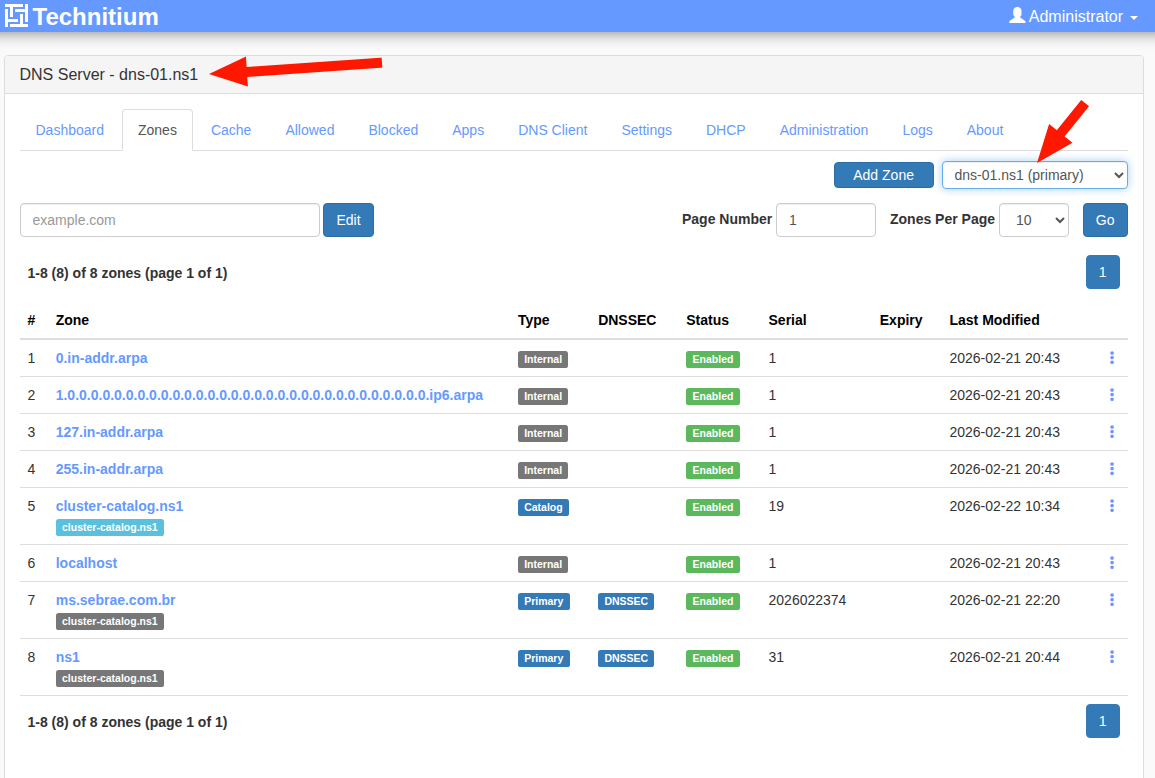
I installed the DNS server Technitium (https://technitium.com/dns/) on my OCI Servers:
1. ns1.tiozaodolinux.com (164.152.199.42) running on port 53 (TCP/UDP) with web console https://web-ns1.tiozaodolinux.com/
2. ns2.tiozaodolinux.com (146.235.37.231) running on port 53 (TCP/UDP) with web console https://web-ns2.tiozaodolinux.com/
The cluster was created in accordance with official documentation - https://blog.technitium.com/2025/11/understanding-clustering-and-how-to.html
It's a fairly simple procedure. It only took a few minutes and the cluster was up and running.
I configured a secondary DNS Server for redundancy. If the primary server fails, the secondary will continue serving DNS requests.
The most time-consuming part is creating and adding entries for a new zone. Since I already had a file containing this information in a format used by BIND9, I simply imported that zone and didn't need to create each entry manually.
¶ Validate Entries
This script was created out of the need to validate whether all entries registered on the new DNS server Technitium have the same values as the entries on the old DNS server (bind)
¶ The simple script
cat << '_EOF_' > validate-dns.sh
#!/bin/bash
#
# Validate DNS entries before migrating to another DNS server.
#
# Jarbas, 13/Fev/2026
# License: MIT
#

set -Eeuo pipefail
trap 'echo "Erro em ${BASH_SOURCE[0]}:${LINENO}: $BASH_COMMAND"' ERR

if [ $# -lt 3 ]; then
    cat << EOF
Usage:
======
    $0 file-with-zone old-dns-server:port new-dns-server:port

    Hint: old-dns-server:port and new-dns-server:port are in format: IP:PORT or just IP for default port 53

Examples:
=========

    $0 ms.sebrae.com.br.zone 8.8.8.8:53 200.53.30.182

    $0 tiozaodolinux.zone 1.1.1.1 164.152.199.42:53

EOF
    exit 1
fi

ZONE_FILE=$1                 # Your zone file
OLD_SERVER_PORT=$2           # Your old DNS server and port
NEW_SERVER_PORT=$3           # Your new DNS server and port

NEW_DNS_SERVER=${NEW_SERVER_PORT%%:*}   # Your new DNS IP
if [[ "$NEW_SERVER_PORT" != *:* ]];  then
    NEW_DNS_PORT=53
else
    NEW_DNS_PORT=${NEW_SERVER_PORT##*:}
fi

OLD_DNS_SERVER=${OLD_SERVER_PORT%%:*}   # Your old DNS IP
if [[ "$OLD_SERVER_PORT" != *:* ]];  then
    OLD_DNS_PORT=53
else
    OLD_DNS_PORT=${OLD_SERVER_PORT##*:}
fi


TMP_FILE=/tmp/dns-records.txt
DOMAIN=$(awk '/^\$ORIGIN/ { print $2 }' "$ZONE_FILE")

# Filter only some types entries
awk '$4 ~ /^(A|CNAME|MX|TXT)$/  { print $1" "$4" "$5 }' "$ZONE_FILE" > "$TMP_FILE"

# It indicates how many records will be processed
TOTAL_RECORDS=$(wc -l < "$TMP_FILE")

cat << EOF

Your domain...: $DOMAIN
Old DNS server: $OLD_DNS_SERVER:$OLD_DNS_PORT
New DNS server: $NEW_DNS_SERVER:$NEW_DNS_PORT
Records active: $TOTAL_RECORDS

EOF

# First record
RECORD=1

# Number of errors
ERRORS=0

echo "Testing... ($TOTAL_RECORDS records)";

while read -r subdom type value;
do
    if [ "$subdom" != "@" ]; then
       fqdn=$subdom.$DOMAIN
    else
       fqdn=$DOMAIN
    fi
    RESP_OLD_DNS=$(host -p "$OLD_DNS_PORT" -t "$type" "$fqdn" "$OLD_DNS_SERVER" | awk '/^'"$fqdn"'/ { $1=""; print $0 }' | sort -n | tr -d '\r\n')
    RESP_NEW_DNS=$(host -p "$NEW_DNS_PORT" -t "$type" "$fqdn" "$NEW_DNS_SERVER" | awk '/^'"$fqdn"'/ { $1=""; print $0 }' | sort -n | tr -d '\r\n')
    if [ "$RESP_OLD_DNS" == "$RESP_NEW_DNS" ]; then # || [[ "$RESP_OLD_DNS" =~ "$RESP_NEW_DNS" ]] ; then
        echo -e "$RECORD)\tOK\t: $fqdn $type $value";
    else
        echo -e "$RECORD)\tNOT OK\t: $fqdn $type $value";
        echo -e "\t\t## OLD_DNS = $RESP_OLD_DNS";
        echo -e "\t\t## NEW_DNS = $RESP_NEW_DNS";
        ((ERRORS+=1))
    fi
    ((RECORD+=1))
done < $TMP_FILE

cat << EOF

Summary:
========
Your domain...: $DOMAIN
Old DNS server: $OLD_DNS_SERVER:$OLD_DNS_PORT
New DNS server: $NEW_DNS_SERVER:$NEW_DNS_PORT
Total Records.: $TOTAL_RECORDS
Errors Records: $ERRORS

EOF

_EOF_

chmod +x validate-dns.sh
¶ Example
¶ Running on the DNS Server 164.152.199.42 on port 53
./validate-dns.sh ~/Downloads/dns/ms.sebrae.com.br.zone 164.152.199.42 146.235.37.231

Your domain...: ms.sebrae.com.br.
Old DNS server: 164.152.199.42:53
New DNS server: 146.235.37.231:53
Records active: 149

Testing... (149 records)
1)	OK	: @.ms.sebrae.com.br. A 34.160.112.175
2)	OK	: 360.ms.sebrae.com.br. CNAME entrada-01

...

149)	OK	: zabbix.ms.sebrae.com.br. CNAME entrada-01

Summary:
========
Your domain...: ms.sebrae.com.br.
Old DNS server: 164.152.199.42:53
New DNS server: 146.235.37.231:53
Total Records.: 149
Errors Records: 0
¶ Filtering entries
grep -v -E "(RRSIG|NSEG)" ~/Downloads/dns/ms.sebrae.com.br.zone > ~/Downloads/dns/ms.sebrae.com.br.txt
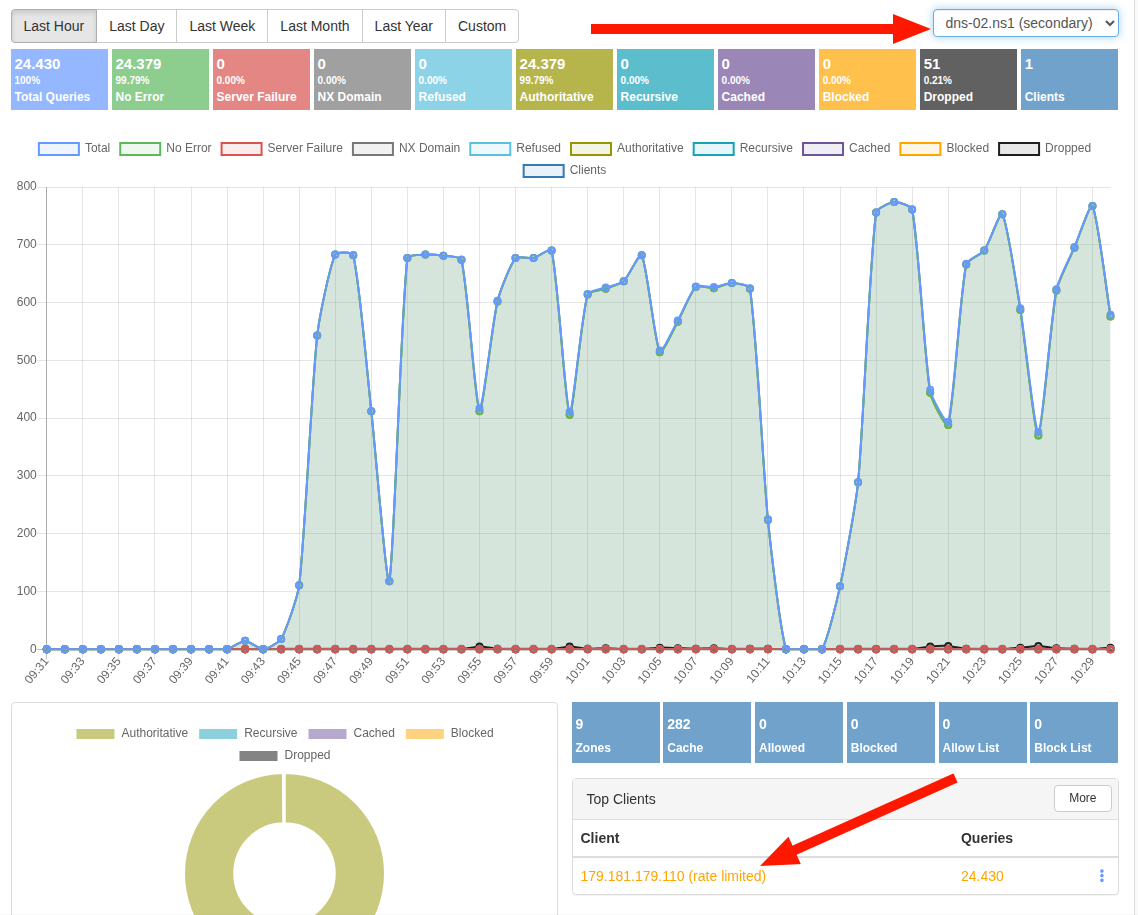
¶ To test if Queries Per Minute (QPM) Limits works correctly, I ran this small script:
i=0; while true; do ((i++)); echo; echo "$i) `date`"; host -t CNAME servicos.ms.sebrae.com.br 146.235.37.231; sleep 0.001; done
¶ References
¶ Oficial Documentation
- Oficial Site - https://technitium.com/dns/
- Concepts and tips - https://technitium.com/dns/help.html
- Source Code - https://github.com/TechnitiumSoftware/DnsServer
- Clustering - https://blog.technitium.com/2025/11/understanding-clustering-and-how-to.html
- Docker installation - https://hub.docker.com/r/technitium/dns-server
- API Documentation - https://github.com/TechnitiumSoftware/DnsServer/blob/master/APIDOCS.md
- Support Logging to external MariaDB - https://github.com/TechnitiumSoftware/DnsServer/issues/1143
¶ Extra Documentation
- Aula fantástica de DNS - https://marianabsctba.github.io/Aulinha_DNS/
- Check DNS Propagation - https://dnschecker.org/
- Best Local DNS - https://www.xda-developers.com/technitium-best-local-dns-tool/
- Primary and Secondary Technitium Authoritative Name Server - https://wiki.opensourceisawesome.com/books/authoritative-dns/page/install-and-configure-a-primary-and-secondary-technitium-authoritative-name-server
- Check Domain Configuration- http://www.webdnstools.com/dnstools/domain_check
- DNSSEC Resolver Test - https://wander.science/projects/dns/dnssec-resolver-test/
- Test DNSSEC Analyser - https://www.internetsociety.org/resources/deploy360/2011/testing-dnssec-analyzer/
- Setup an High Availability - https://cloudalbania.com/2024-04-setup-an-high-availability-technitium-dns-server-cluster-at-home/
- DNS Monitoring in Zabbix 7.0 - https://www.zabbix.com/forum/zabbix-help/509771-dns-monitoring-in-zabbix?p=509773#post509773
- Built My Own DNS Server - https://medium.com/@karfianto/public-dns-servers-are-either-too-loose-or-too-strict-so-i-built-my-own-dns-server-dfbabddababd
- With Ansible - https://medium.com/codex/technitium-dns-server-setup-and-maintain-records-using-ansible-ed88ba911743
- IntoDNS checks the health and configuration and provides DNS - https://intodns.com/
- DNS Delegation: Concepts and Best Practices - https://www.logicmonitor.com/deep-dive/dns-monitoring/dns-delegation
- Block Ads and Host Your Own DNS - https://www.it-connect.tech/technitium-dns-server-block-ads-and-host-your-own-dns/
¶ Some good vídeos
- Your HomeLab DNS Needs a Backup // Technitium - https://www.youtube.com/watch?v=-mc6-uem7vM
- Technitium Recursive DNS Server Tutorial - https://www.youtube.com/watch?v=D1e-3ruBkqA
- Fixing My DNS with Technitium - https://www.youtube.com/watch?v=62crffG6Uw8
- Oracle Cloud VPS: Technitium DNS Server - https://www.youtube.com/watch?v=fRPZP-BJb-Q
- Stop Using Pi-Hole Sync Tools – Technitium DNS Clustering Is Better - https://www.youtube.com/watch?v=Hz5n1TIUzik
- What should YOU use for DNS in YOUR Homelab? - https://www.youtube.com/watch?v=S5D6uksel10
- Technitium vs Pi‑hole vs AdGuard DNS vs NextDNS: Best DNS Blocker in 2026? - https://www.youtube.com/watch?v=9DTpA17PuNQ
- How To Install & Configure Technitium DNS Server on Proxmox - https://www.youtube.com/watch?v=m3lNqy3HAvA
- Technitium vs Pihole vs Adguard vs NextDNS - Best Ad-Blocking Software In 2026? (FULL COMPARISON! - https://www.youtube.com/watch?v=sjY6F0Ko9Uw
- DNS Monitoring in Zabbix 7.0 - https://youtu.be/ADl4ZqMh35A?si=0swBKkguM9ZM7wEX&t=431